Introducing FerriteCMS: a WordPress-style CMS in one Rust binary
FerriteCMS compiles a whole CMS — web server, admin, themes, plugin runtime and SQLite — into one binary, runs every plugin in a WebAssembly sandbox, and lets AI assistants manage the site over MCP. Open source, AGPL-3.0, v0.2.0.
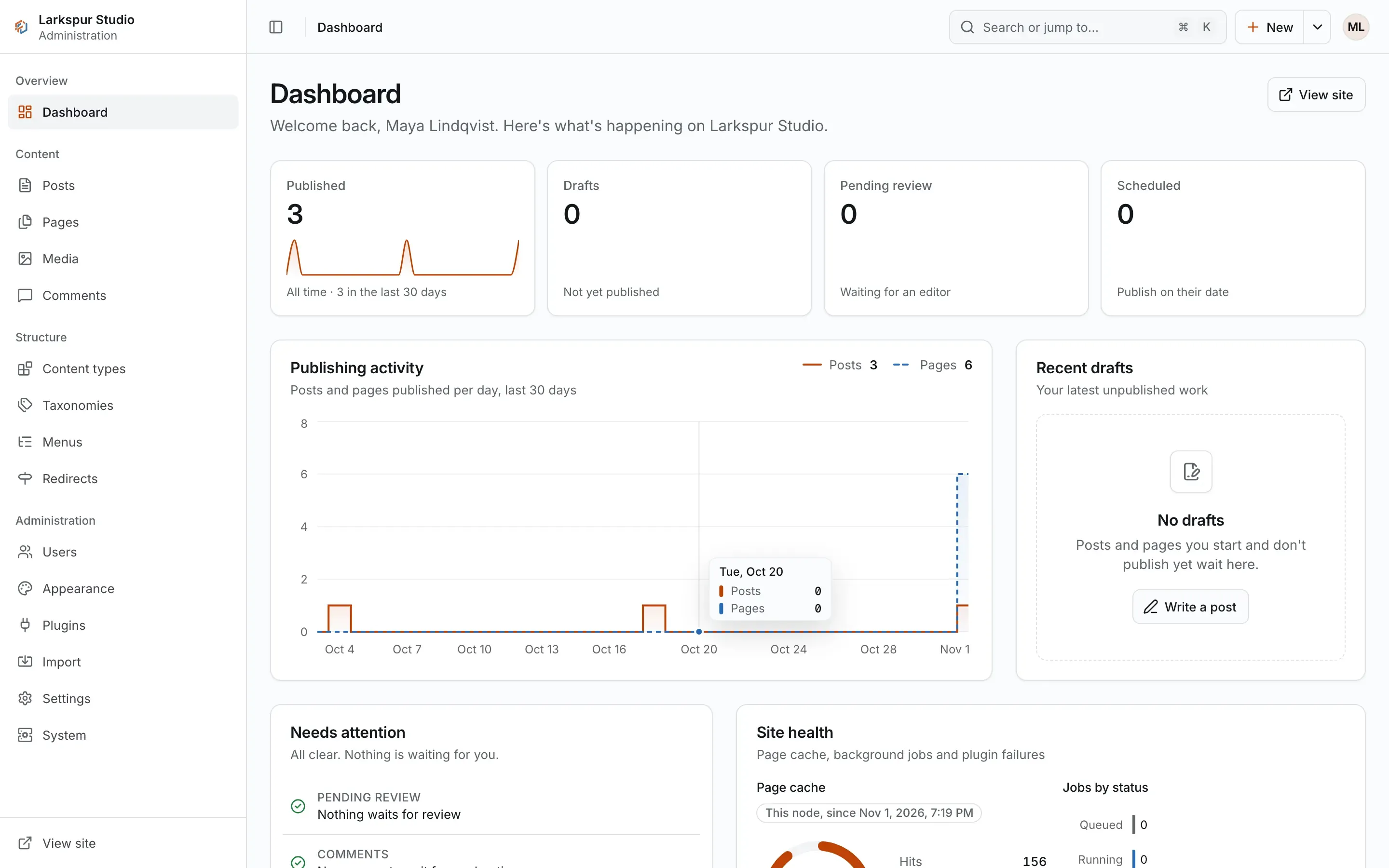
A WordPress-style site normally drags a web server, a language runtime, a database and a pile of fully-trusted plugins behind it. FerriteCMS is my answer to that: the whole CMS shipped as one Rust binary, where every plugin runs in a WebAssembly sandbox and can only do what it declared. The repository went public on 22 October; v0.1.0 followed on 1 November and v0.2.0 on 2 November.
One binary, one folder
ferrite init creates a site in a single folder and ferrite serve runs it. The web
server, the admin (a React app embedded in the binary), the starter themes, the plugin
runtime and SQLite are compiled in, so backing up or moving a site is copying one folder.
It runs in two shapes: solo, on SQLite and local media, or cluster, on Postgres and
S3-compatible storage across several nodes.
The admin covers what you would expect from a CMS: a rich-text editor with autosave and
revisions, a media library, content types with custom fields, taxonomies, menus, comments,
users, settings, themes, plugins and system status. Underneath sits a REST API under
/api/v1 with an OpenAPI spec, sessions, scoped API tokens and TOTP.
Plugins that can only do what they declared
Plugins are WebAssembly components with a permission manifest and memory, CPU and time limits on every call, so a broken plugin can’t take the site down or read your users table. The plugin API is defined in WIT, and three example plugins (SEO, analytics, a contact form) ship as a release asset. For WordPress developers the model is deliberately familiar: hooks with priorities, a template hierarchy, post types, roles.
Manage your site from an AI assistant
New in v0.2.0: every site serves a Model Context Protocol
endpoint at its address plus /mcp. Connect Claude, ChatGPT, Claude Code, Cursor or VS Code,
sign in to your site once through its own consent screen, approve what the assistant may
touch, and ask it to write, publish, organise and check the site. 56 tools cover posts and
pages, media, terms, menus, content types, redirects, comments, settings, themes, plugins
and the site’s health.
The assistant acts as you, with your role narrowed to the areas you approve, and its changes are recorded in the audit log under the app’s name. Installing plugins, managing users and tokens, imports and backups stay with people. With Claude Code it is one line:
claude mcp add --transport http ferrite http://localhost:8080/mcpMoving off WordPress
Export the site in WordPress (Tools → Export), then:
./ferrite import wordpress export.xml --data ./mysite --uploads ./wp-content/uploadsPosts, pages, media, taxonomies, users, comments, menus and 301 redirects come over, and the import writes a report of everything it converted, skipped or redirected. A folder of Markdown files imports too.
Try it
Download a release for Linux or macOS (x86_64 or aarch64) from
Releases — every release’s
SHA256SUMS is signed with minisign — or use the Docker image:
VERSION=0.2.0
TARGET=x86_64-unknown-linux-gnu
curl -LO https://github.com/softberries/ferritecms/releases/download/v$VERSION/ferrite-$VERSION-$TARGET.tar.gz
tar -xzf ferrite-$VERSION-$TARGET.tar.gz && cd ferrite-$VERSION-$TARGET

./ferrite init --data ./mysite --url http://localhost:8080
./ferrite seed demo --data ./mysite        # optional: sample posts, pages and menus
./ferrite user create --data ./mysite --login me --email me@example.com
./ferrite serve --data ./mysite
The site is at http://localhost:8080 and the admin at http://localhost:8080/admin/.
Operations are built in: backups, restores and exports, signed self-update with rollback,
built-in HTTPS (ACME) for single-node sites, Prometheus metrics and ferrite doctor.
Where it fits, honestly
It is an early release: expect changes before 1.0. The plugin catalogue is the three
examples, not a WordPress-sized ecosystem, and themes are the three starters (blog,
docs, business) plus what you write. The documentation site is built with FerriteCMS
itself, which is also where to start reading.
Links
FerriteCMS is licensed under AGPL-3.0-only, with a commercial license available on request; plugins and themes you write are exempt from the AGPL through an additional permission, so you can license them under any terms you like.