Introducing Tayga: every failing request, explained
Tayga turns OpenTelemetry traces and logs into error stories, with a root cause, a critical path and a diff against normal. v0.1.0 is out, self-hosted and AGPL.
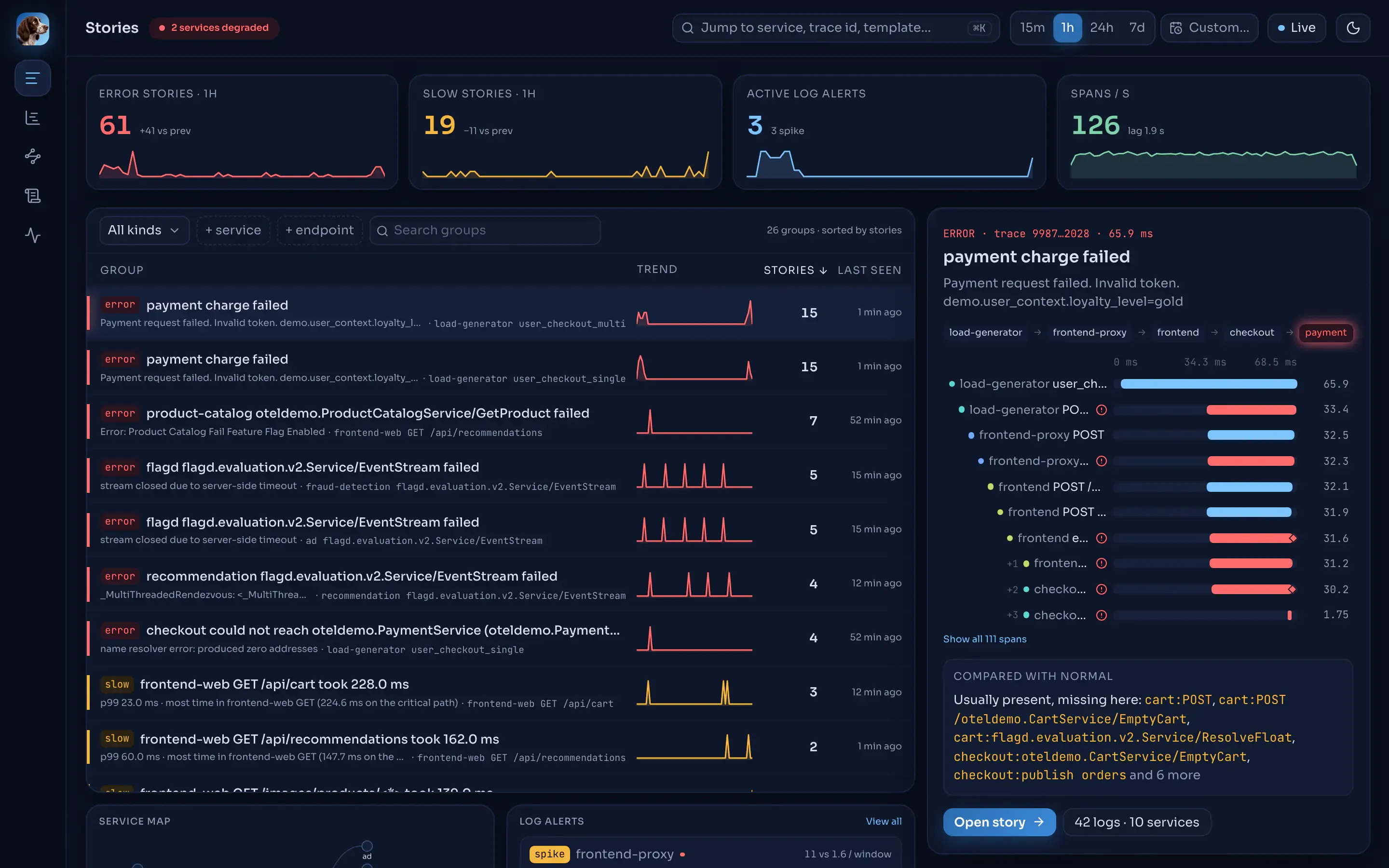
Tayga v0.1.0 is out today. It is an open-source, self-hosted tool that reads your OpenTelemetry traces and logs and turns them into error stories: for each failing or slow request it shows the root-cause span, the request path across services, the critical path, a diff against the endpoint’s normal baseline, and the logs that matter.
The problem
Collecting traces is the easy part now. OpenTelemetry gives you a standard way to get spans and logs out of every service. What you get back is a trace explorer: a search box, a list of trace ids and a waterfall. When checkout starts failing at night, someone still has to open traces one by one, work out which span actually failed, compare it with what a healthy request looks like, and then go and find the matching log lines.
I wanted that work done before anyone opens the UI.
What Tayga does
Tayga analyses traces as they stream in. By the time you open it, the failing requests are already explained, and repeats of one problem fold into one story group instead of hundreds of separate traces.
- Error and slow stories. Every assembled trace is checked. A failing request becomes a story, and so does one slower than max(p99 × 1.5, p99 + 100 ms) of its endpoint’s baseline.
- Deterministic root cause and critical path. Fixed rules over the span tree, no LLM. The same input gives the same answer, in a sentence such as “
checkoutcould not reachpayment”. - Comparison with normal. Operations that are new, missing or slower than in the endpoint’s baseline from the last hour.
- Story groups. A fingerprint of the kind, endpoint, root-cause span and masked message folds repeats into one group with a trend.
- Log templates and log alerts. Tayga mines each service’s logs into templates at ingest, using Drain, and alerts on new templates, rate spikes and, when you ask for it, silence. Alerts go to webhooks and Slack.
- Service map and trace explorer. Rate, error ratio and p99 per service against its 24-hour baseline, plus a duration scatter, waterfall and span drawer for any trace.
- Pipeline health built in. The API records every service’s metrics itself, so you see throughput and consumer lag without running Prometheus.
The “no LLM” part is deliberate. When a tool tells you why production is broken, you want to be able to check its reasoning and get the same answer twice.
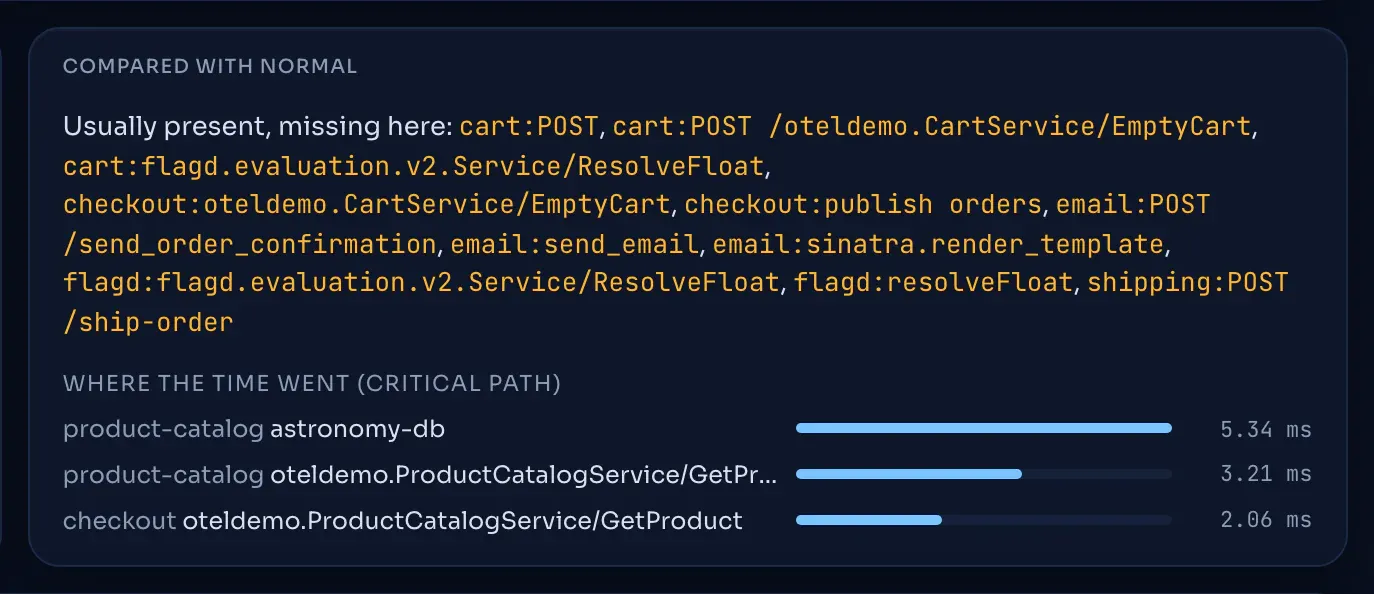 Compared with normal: what is missing and where the time went.
How it works
Tayga is written in Rust, reads standard OTLP, stores in ClickHouse and streams through Redpanda. It is a handful of small services:
- Ingest.
tayga-ingestreceives OTLP over gRPC or HTTP and publishes one record per trace id per export request to Redpanda, keyed by trace id, so every span of a trace lands on the same partition. Logs also go to a second topic, keyed by service. - Assemble and analyse. The assembler closes a trace after 10 s without new spans (60 s at most), builds the span tree, and turns failing and slow requests into stories with a root cause, a critical path and a baseline diff.
- Explain and alert. The logminer mines templates per service and raises new, spike and silence alerts; the notifier delivers them.
tayga-apiserves the web app and the JSON API from ClickHouse.
Keying by trace id is what makes the rest simple: every span of a trace reaches the same assembler partition, so the trace can be assembled in one place. Logs need the opposite, because Drain keeps one template tree per service, so they are published a second time keyed by service.
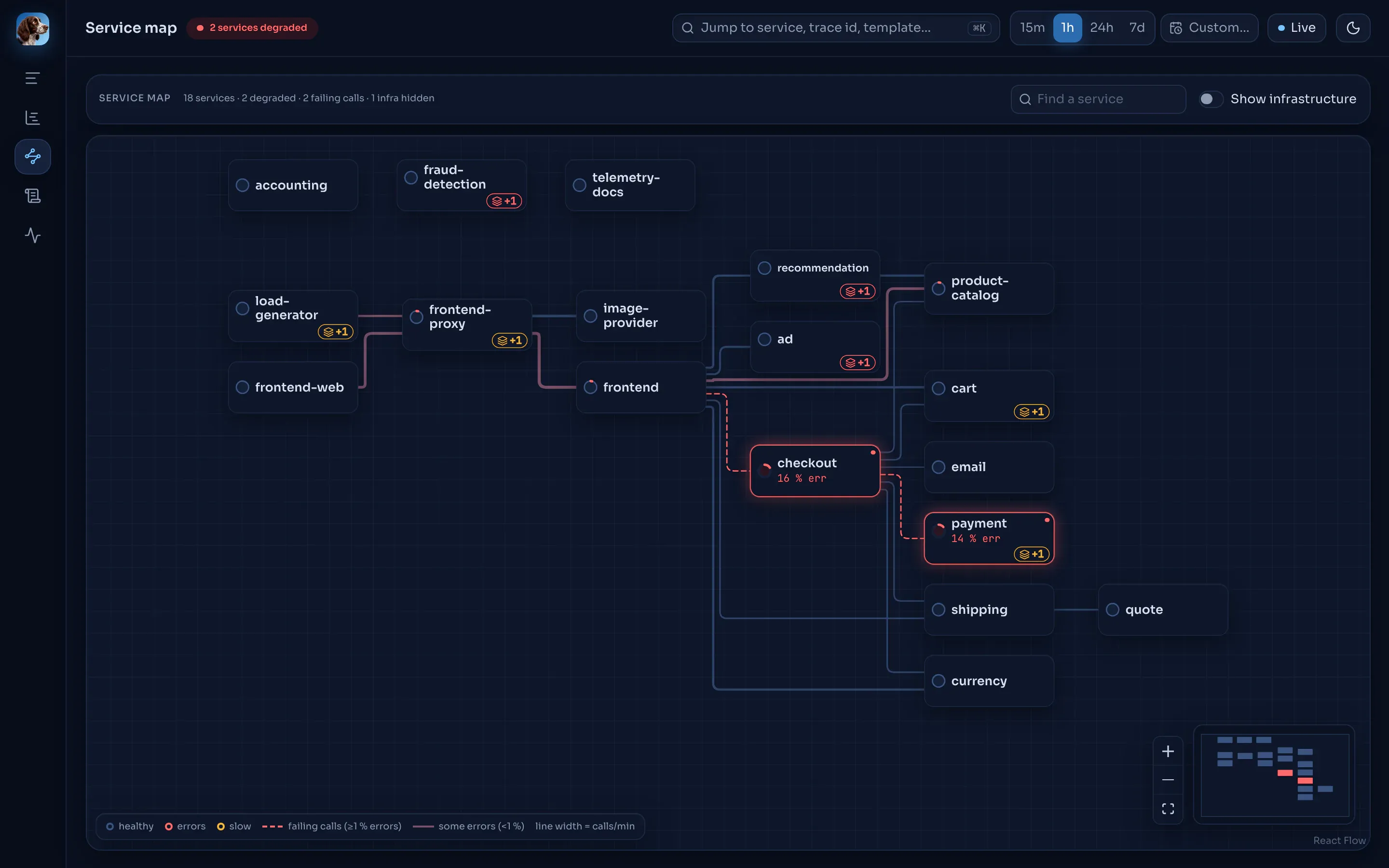 The service map, with the services on the failing path marked.
Measured, not promised
The README and the docs carry a benchmarks table, measured on one machine (an Apple M3 Max) on 6 and 7 October, with the method and raw tables published. Two rows I like: Drain costs 2.818 µs per log line in a single-threaded criterion run over a 50,000-line corpus, and a fingerprint cache in front of it makes that 6.98× faster with identical templates, checked by a differential test. One row says GPU fingerprinting was slower than the CPU version at every size I tried, so it was not shipped. That is one machine and one workload, not a guarantee, and the docs say so.
The same goes for every other claim. The README ends with a “Verified claims” table that points each statement at the code, test or live run that backs it, and the docs site has the full list.
Where it fits, and where it does not
Tayga is a focused tool. It does not ingest OTel metrics, its root cause is always a span (so infrastructure problems show up only through their effect on requests), and it has been tested against the OpenTelemetry demo, not at large scale. If you need application metrics and your own dashboards, a hosted service, or proven scale, a broader product is the better choice. The comparison page lays out Jaeger, Grafana LGTM, SigNoz, Coroot, OpenObserve, ClickStack and the commercial platforms side by side, with a source for every cell. Tayga can also sit next to any of them: it takes OTLP from the same Collector, and its trace view links out to Jaeger.
Try it
Docker Compose: Tayga, ClickHouse and Redpanda on one host. The installer checks the ports, waits for health, and prints the URLs:
curl -fsSL https://raw.githubusercontent.com/softberries/tayga/master/scripts/install.sh | shOpen http://localhost:8090 and send OTLP to localhost:4317 (gRPC) or localhost:4318 (HTTP).
Kubernetes, with bundled single-node ClickHouse and Redpanda for evaluation, or your own for production:
helm install tayga oci://ghcr.io/softberries/charts/tayga --version 0.1.0 \
  --namespace tayga --create-namespace --wait
The quickest way to see what it is for is to break something on purpose. Run Tayga next to the OpenTelemetry demo shop and make every payment fail:
git clone --recurse-submodules https://github.com/softberries/tayga.git && cd tayga
make up                                      # the shop and Tayga: http://localhost:8090
make flag NAME=paymentFailure VARIANT=100%   # every payment now fails
make flags-reset                             # put the flags back
A payment story appears with its root cause in the payment service’s charge span and the request path from the load generator through checkout to payment.
About the name
Tayga, properly spelled Tajga, is my hunting dog. Tajga can trace anything, anywhere, in the harshest conditions. I love that dog as much as I love writing software, so the name was obvious. The “y” is for English speakers, who wouldn’t read Tajga the way it’s meant ;)
Licence and links
The core is licensed under the AGPLv3. Tayga Enterprise (SSO, multi-tenancy, high availability and more) is available on request under a commercial licence; write to hello@softberries.dev.
- Code: github.com/softberries/tayga
- Docs: softberries.github.io/tayga, including a narrated tour
- Release: v0.1.0
Issues and pull requests are welcome.